Convert Visual Edits into AI-Ready Code Prompts in Chrome
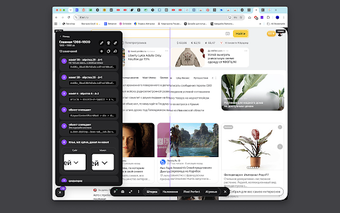
Design Review, developed by Lizard Studio, is a Chrome extension that converts visual design feedback into implementable code prompts for AI coding agents. It lets users inspect page elements, apply live visual tweaks, and annotate screenshots while previewing changes directly in the browser. The tool produces structured, machine-readable prompts and captures stable CSS selectors for more reliable handoffs. Frontend developers, UI designers, and product teams who use AI-assisted coding gain faster, more accurate design-to-code iterations without external cloud uploads.
The extension converts visual critique into AI-executable instructions
The tool bridges design review and implementation by packaging DOM context and selector hints that an AI agent can act on. Its output is formatted so Claude Code, Cursor, or similar agents receive clear, machine-readable instructions rather than freeform notes. That approach reduces ambiguity in translation from mockup to markup, because the prompt supplies both the visual change and the exact DOM targets the agent must locate.
Local-first architecture keeps reviews on the developer’s machine
The extension follows a local-first model, storing screenshots, annotations, and edits on the user’s device and requiring no account. That zero-account design means nothing is uploaded to an external backend, which suits teams working on private repositories or regulated interfaces. Because the tool runs inside Chrome on desktop platforms, it does not introduce mandatory server-side processing into the typical review flow.
It integrates with AI workflows but requires a manual handoff step
Stable selector capture avoids fragile, hashed class names so generated prompts are more likely to map to source files when delivered to an AI agent. A one-click Copy Prompt feature formats the change for Claude Code and Cursor, but the workflow expects the user to paste that prompt into the chosen agent rather than applying repository patches automatically. That design favors explicit control over silent automated edits.
Useful for AI-assisted design handoffs, with a deliberate manual trade-off
The tool is a pragmatic option for frontend developers and UI designers who rely on AI coding agents to translate visual edits into code, since it packages DOM context and stable selectors into executable prompts. The primary trade-off is that applying updates requires delivering those prompts to an external agent or service, which adds a manual step for teams that expect fully automated repository updates.